
Built for real smartphone handling
Large touch targets, fast lists, and less friction between scanning, reviewing, and saving.
Booky is an Android-first app for people who do not want to manage their personal library in spreadsheets or scattered notes. It combines ISBN scanning, clean metadata, reading progress, local backups, and an intentionally optional Google cloud backup in one calm mobile flow.
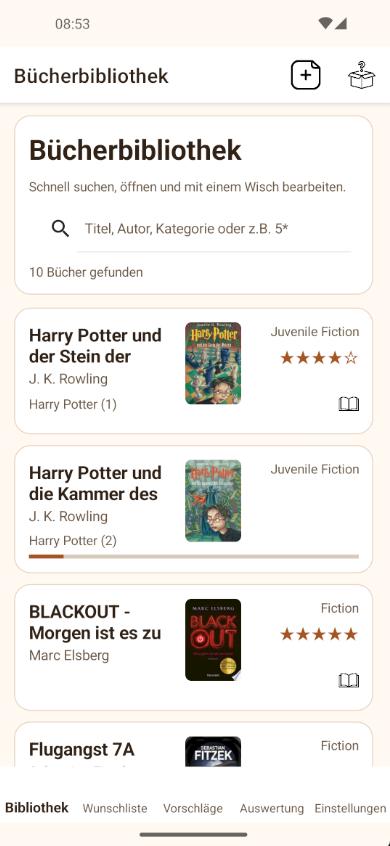
This section uses a real Booky screenshot instead of a stylized mockup. The current capture is shown in German.
Large touch targets, fast lists, and less friction between scanning, reviewing, and saving.
Library, wishlist, notes, progress, and local backups work without requiring cloud as a baseline.
Google cloud backup is optional by design and stores snapshots only in your account's private appData area.
The website should not only build trust, but also explain why Booky feels solid in everyday use: short paths, clear feedback, and features that do not get in each other's way.

Track books you already own and books you still want without forcing everything into one generic list.

Capture a single title or scan multiple ISBNs in a row, review the preview list, and save them together.
If you want it, Booky can create private snapshots through Google Play Services in your Google Drive appData folder.
Booky is more than a simple title list. The app combines structured book management, search and cover helpers, privacy guidance, and robust restore paths in a focused Android product.
ISBN scanning, title and author lookup, and cover loading help you build your collection quickly.
Booky does not only store that you own a book, but also how far you are and how you rate it.
For safety, export/import, local restore points, and optional Google cloud snapshots are available side by side.
A few topics matter most on a public product website: what Booky stores, how cloud backup works, and whether the app remains useful without Google.
No. Core features for library management, wishlist, reading progress, local backups, and exports work without a Google account. You only need one for optional cloud backup.
No. If you enable cloud backup, Booky uses the private Google Drive appData area. It is reserved for the app and not meant as a normal free-form file folder.
Yes. That is exactly what the multi-ISBN scan flow is for. You scan several books, review the preview list, and then save them together.
No. The app intentionally separates library and wishlist so owned and desired books stay clearly distinct.